Pinwheel

Grows with your child. Parents control the pace.

Buy for Parents of tweens aged roughly 10–13 who need some app access with meaningful parental oversight
Bottom line The best kid-safe phone for tweens — parent-controlled app permissions that can grow with the child over several years.
Price
around $150 + subscription
Check price →

Pros & cons

Pros
  • Parent dashboard controls which apps are available — can be expanded over time
  • Curated app marketplace (not full Google Play Store) reduces exposure to harmful content
  • Android-based, so interface is familiar to both parents and children
  • GPS location and message visibility for parents
  • Designed to develop alongside the child — appropriate for multi-year use
Cons
  • Subscription required for full parent dashboard functionality
  • More expensive than basic kids' feature phones
  • Android foundation means a technically persistent child may find edge cases
  • Some educational or utility apps may not yet be in Pinwheel's curated marketplace
  • Less absolute restriction than Gabb Phone — suited for older, more independent children

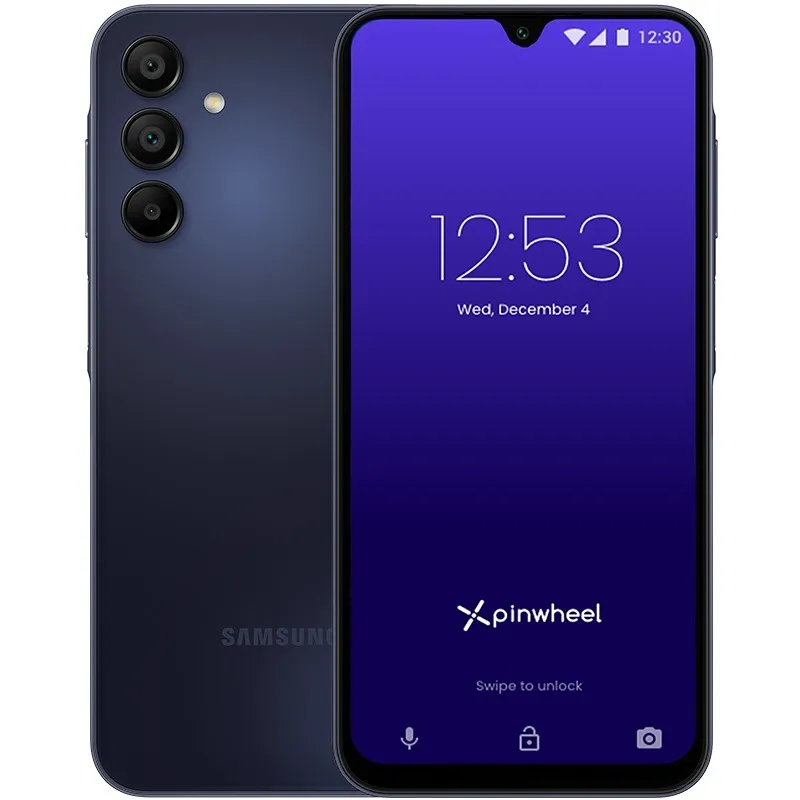
Pinwheel is an Android-based smartphone running a custom Pinwheel launcher and operating system layer developed by the company of the same name. According to manufacturer documentation, the phone comes with a curated app marketplace rather than the full Google Play Store. Parents approve specific apps for installation through a parent dashboard, and permissions — including which apps are available, screen time limits, and contact restrictions — can be adjusted as the child's maturity and needs evolve. The system is designed to grow with the child over multiple years.

According to Pinwheel's documentation, parents manage the device through a companion app and web dashboard. Available controls include: approving or removing specific apps from the child's device, setting screen-time schedules, filtering web content if a browser is enabled, monitoring SMS messages, and tracking GPS location. The curated app marketplace contains Pinwheel-reviewed applications; apps outside the marketplace require parental approval before installation. User reports describe the dashboard as more granular than the Gabb Phone's parent interface, at the cost of requiring more ongoing parental management.

Pinwheel is best suited for parents of children aged roughly 10–13 who are at a stage where some app access is appropriate — educational tools, safe social apps, communication with friends — but where an unrestricted smartphone would be premature. The "grows with the child" design philosophy is well-suited to this age range: permissions can be conservative initially and expanded as the child demonstrates trustworthy use. User reports from parents describe it as a sustainable device across two to three years of tween development.

Parents of younger children (under 10) who want the simplest possible restriction will find Gabb Phone more appropriate and less expensive. Parents of teenagers who want monitoring rather than restriction should consider the Bark Phone instead. Pinwheel's subscription cost also makes it a less attractive option for parents who only need a basic communication device and are comfortable with Gabb's simpler model.

Pinwheel earns a Buy for its target age group. The curated-marketplace approach is a meaningful middle ground: not as locked-down as a Gabb Phone, not as permissive as a standard Android device. The ability to expand permissions as the child matures is the feature that most distinguishes it from single-age-targeted alternatives, and user reports consistently describe it as a device that extends its useful life well beyond a single year.
Vs. closest alternative

How it compares
Pinwheel vs. Gabb Phone

Pinwheel and Gabb Phone both serve children, but at different ages and with different philosophies. Gabb Phone uses hardware-level restriction: no apps, no browser, nothing to configure. Pinwheel is Android-based with a curated marketplace — parents approve apps, and the device can evolve as the child matures. For younger children (8–11) who need calls and texts only, Gabb Phone is simpler and adequate. For tweens (10–13) who need some app access and a phone that can last several years without feeling like a baby device, Pinwheel is the better choice.

Read Gabb Phone review →
Our verdict
An Android phone with parent-controlled permissions that can grow with the child — the middle path between a locked-down kids' phone and an unrestricted smartphone.
Buy it →

FAQ

Can my child access social media on Pinwheel?

By default, no. According to Pinwheel's documentation, social media apps are not available in the initial configuration. Parents can approve age-appropriate social apps from the curated marketplace as they judge appropriate.

What happens to the Pinwheel setup if the child resets the phone?

According to Pinwheel's documentation, the parental controls are embedded at the OS level and survive a factory reset. The device re-enrols in Pinwheel management on restart.

Is a subscription required to use the phone at all?

Basic device functionality works without a subscription, but full parental dashboard features — including app approval, location, and message monitoring — require the Pinwheel subscription. Check pinwheel.com for current plan pricing.

Last reviewed: 2026-05 Research-based · Screen Free Zone